The Dangerous Yet Safe Beast: Tor Browser
When you think of the Tor browser, the first image that comes to mind is ‘crime’. Indeed, many cybercriminals (black hat hackers) use this Tor browser to conduct illicit transactions and securely protect their information. In short, what we call the “dark web” refers to web pages accessed through Tor. However, this seemingly ominous Tor Browser was originally created with “security” as its core focus. It shares a similar context with Telegram - both were built with a focus on security, but their excellent security features inadvertently attracted many criminals.
So how does the Tor browser manage to hide users’ information?
The Onion! Exactly!

When you think of Tor Browser, an onion comes to mind - everyone associates it with onions. Why? Because the name itself is an abbreviation of “The Onion Router” (Tor), and its actual operating principle involves wrapping data in multiple layers of encryption, like an onion, before sending it over the internet.
When using Tor browser, your internet traffic doesn’t go directly to the destination server. Instead, it’s transmitted through at least 3 servers (nodes) scattered around the world, run by volunteers. Note that even the logo above shows three layers stacked together.
Volunteers: People who support the Tor network by donating their computers, internet bandwidth, etc. These can be individuals, organizations, or companies.
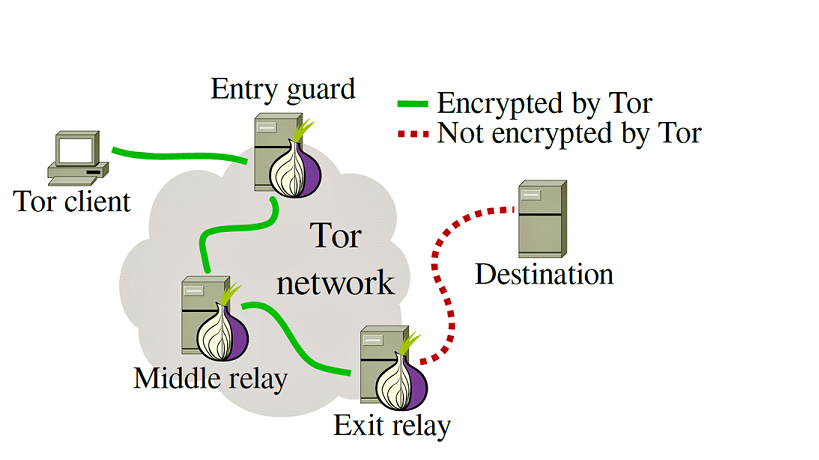
So when accessing Google from your computer:
- Your computer creates [Package for A [Package for B [Package for C [Data]]]]
- Sends it to A (Entry guard)
- A sends [Package for B [Package for C [Data]]] to B (Middle relay)
- B sends [Package for C [Data]] to C (Exit relay)
- C sends [Data] to Google
Because it’s transmitted this way, Google only knows it received data from C, C only knows it received from B, B from A, and A from your computer. As a result, no one except you knows the complete route.
Moreover, Tor Browser’s nodes change the A-B-C route approximately every 10 minutes or whenever you access a new site. With its distributed and decentralized structure, finding the connection from your computer to Google becomes practically impossible, making tracking extremely difficult.
So Is Tor the Best?

While it’s exceptionally superior in terms of security, that doesn’t mean it’s the best overall. As mentioned above, since data passes through three nodes, accessing Google itself becomes slower for the user’s browser as well. Also, no matter how tightly you wrap yourself for security when entering the internet world, you may still need to surrender your personal information depending on which services you use. For example, signing up or logging into Google or Reddit requires providing your personal information to fully utilize the service, no matter how much you encrypt your data. Therefore, it’s best to use a browser that suits your needs.
Additionally, not all Tor browser users are criminals, so it’s best not to think of it negatively or positively, but simply as just another browser.
Later, I’ll research whether there are any issues with posting about it, and if there aren’t, I’ll create a post about creating your own secret server accessible only within the Tor network using Tor Hidden Service (Onion Service). (Though I doubt it’ll work out.)
Comments